Showing posts with label Original Content. Show all posts

Tuesday, October 25, 2011

Social media in medicine: How to be a Twitter rockstar and help your patients and your practice

This is the key concept from a series of talks that I presented at several national and international meetings in 2011-2012 (CSACI, AAAAI and WAO) - TIC, Two Interlocking Cycles:

- Cycle of Patient Education
- Cycle of Online Information and Physician Education

The two cycles work together as two interlocking cogwheels (TIC).

Cycle of Patient Education (click here to enlarge the image). An editable copy for your presentation is available at Google Drive:


Cycle of Online Information and Physician Education (click here to enlarge the image). An editable copy for your presentation is available at Google Drive:


The first presentation was during the annual meeting of the Canadian Society of Allergy and Clinical Immunology (CSACI) and brought a lot of engaged, useful, and interesting questions. Feel free to use the images in your own presentations with credit to AllergyCases.org.

The two cycles work together as two interlocking cogwheels. Here is how to facilitate the Rise of the ePhysican who works hand in hand with the ePatient:


Products of the Cycle of Patient Education: EQUALS

- Energy!
- Quality of life is improved
- Understanding of patient condition is improved
- "Affinity" - better physician-patient relationship leads to increased referrals to the practice, e.g. 2-5 new patients per week per physician, increased revenue
- Lower rate of ER visits, hospital admissions, phone calls
Savings for patient and health system

What is Return On Investment (ROI) of Cycle of Patient Education?

Calculated ROI:

- 2 new patients per week who come to the clinic directly from the blog/Twitter account
- $500 reimbursement for 2-3 visits (initial visit and 1-2 followup visits)
- 50 weeks x 2 patients = 100 new patients per year
- 100 patients x $500 = $50,000 per year

The best interest of the patient is the only interest to be considered

The purpose of the cycle is not to make money. As the Mayo Clinic CEO pointed out recently, Mayo Clinic intends to be the leader in social media in healthcare but this is not about competitive advantage, it is about the patient. The best interest of the patient is the only interest to be considered. Social media makes the union of forces more broadly practical than at any time in human history.

Social media for physicians: Do I really need to be on Twitter, Facebook and YouTube?

(the text below uses the specialty of allergy and immunology as an example, an edited version was published on the website of the World Allergy Organization where I write a monthly column)

It certainly looks like social media is taking over the world. Facebook is a “country” with more than 750 millions citizens. Twitter has more than 250 millions users. Google+ is the fastest growing web service and history and reached 25 million users in just one month after its launch. As an allergist, you may ask yourself, “Where is my place in all this? Do I have to be on Twitter? Do I have to use Facebook and YouTube to stay relevant?” The answer is yes.

With the recent update of Google called "Search Plus Your World", individuals, physician practices and organizations without social media presence will be pushed further down the page of search results. That means, unfortunately, that if your practice does not have a strong social media presence, when patients/physicians search for a health topic, they may not see the quality results they deserve.

Number of Tweets Predicts Future Citations of a Specific Journal Article

Twitter is becoming essential for both authors and publishers of scientific literature. Highly tweeted journal articles are 11 times more likely to be highly cited than less-tweeted articles. Top-cited articles could be predicted from top-tweeted articles with 93% specificity and 75% sensitivity. A "twimpact" factor is proposed that measures uptake and filters research resonating with the public in real time (Med Internet Res 2011;13(4):e123. http://www.jmir.org/2011/4/e123).

You can be a physician and a social media superstar at the same time

Social media can provide a focused and time-efficient learning experience. Sharing relevant medical news with patients is just a click away. The paramount is to protect patient privacy at all times and to comply with your employer and professional organization guidelines. You can be a physician and a social media superstar at the same time. Here is how in 3 easy steps.

1. Use of Internet to learn and stay up-to-date

- Web feeds (RSS and Atom) work great for for targeted updates from journals, websites, and allergy/immunology news. RSS stands for Really Simple Syndication and consists of updates pulled from a particular website whenever something new is published. RSS feeds can be separated in different categories, e.g. asthma, allergic rhinitis, etc. Web-based RSS readers (Google Reader, Feedly, Flipboard) function as “inbox for the web”. You can get all sources delivered in one location - a web-based reader

- Blogs and Twitter accounts. A selected list of high-yield blogs and Twitter accounts of board-certified allergists/immunologists includes: @JuanCIvancevich (Juan C. Ivancevich, Buenos Aires, Web Editor of the World Allergy Organization), @wheezemd (Michael Blaiss, MD, Past President of the American College of Allergy, Asthma, and Immunology), @DrSilge (Robert Silge, MD, allergist/immunologist, Salt Lake City, Utah), @AllergyNet ( John Weiner, allergist, clinical immunologist, Melbourne, Australia), @MatthewBowdish (Matthew Bowdish MD, allergist/clinical immunologist, Colorado), @allergydoc4kidz (Stuart Carr, allergist/immunologist, Canada), and the author’s own Twitter account at @Allergy.

- Podcasts for allergy and immunology education represent mobile-based MP3 files and services with automatic subscription. Free podcasts/videocasts are provided by COLA Allergy (ACAAI, http://childrensmercy.org/content/view.aspx?id=5979), Journal of Allergy and Clinical Immunology (AAAAI, http://jacionline.org/content/podcast), and World Allergy Organization (http://journals.lww.com/waojournal/Pages/podcasts.aspx).

- Persistent searches for topics of interests in allergy/immunology. You can subscribe to RSS feeds for "persistent searches" in PubMed and Google News for the topic of your interest, e.g. “oral immunotherapy for food allergy”.

- Text-to-speech (TTS). You can use text-to-speech to listen to journal articles at a later time. The text-to-speech programs convert the the text of a journal article into an MP3 file. A free program is Balabolka (http://cross-plus-a.com/balabolka.htm).

- Clinical cases and practical questions are available from the World Allergy Organization Journal, AllergyCases.org (disclaimer: the author is the founder of the website), AAAAI Ask the Expert (http://aaaai.org/ask-the-expert.aspx).

2. Use of Internet and computers for patient education

- Patient education diagrams - web- and iPad/tablet-based diagrams are well-received by patients and doctors in training. The the author's survey at the allergy clinic of the University of Chicago showed a 95% patient approval rate for iPad use for patient education. The diagrams used in the study are available here: Diagrams for Patient Education.

- Videos for patient education can be viewed on tablet or netbook. The videos can be streatmed from the physician's website or downloaded locally. Targeted videos can be used for patient education before and during the visit, for example, “what to expect from your visit at the allergist office”, “how to use an inhaler”, etc. There is a continuum of education - start at the office (tablet or netbook), then continue at home (web-based videos and selected educational brochures and links).

- Ready-made patient education brochures can be printed from allergist's website. A custom-made search engine can generate brochures on demand, e.g. Medline Plus.

3. Use of Internet to promote your practice and collaborate

- Start a website for free (WordPress.com or Blogger.com). Start a Twitter account and professional Facebook page for your practice.

- Setup persistent searches for your name/practice on Google, Twitter, etc. and subscribe to RSS for automatic updates. You can address questions and concerns whenever they arise.

- Use Google Docs for research collaboration, creating diagrams for patient education, office calendar, and spreadsheets.

Risks of social media use by physicians

Physicians must maintain appropriate boundaries of the patient-physician relationship in accordance with professional ethical guidelines just as they would in any other context. When physicians see content posted by colleagues that appears unprofessional they have a responsibility to bring that content first to the attention of the individual, so that he or she can remove it and/or take other appropriate actions. If the behavior significantly violates professional norms and the individual does not take appropriate action to resolve the situation, the physician should report the matter to appropriate authorities (Source: AMA Policy: Professionalism in the Use of Social Media, 2011).

12-Word Social Media Policy by Mayo Clinic: "Don’t Lie, Don’t Pry, Don’t Cheat, Can’t Delete, Don’t Steal, Don’t Reveal" (http://goo.gl/1Jwdo).

Advice for Physician Who Use Social Media for Professional Purposes

- Write as if your boss and your patients are reading your blog every day
- Comply with HIPAA, e.g. never publish any identifiable information without patient permission
- Consider using your name and credentials on your blog and other social media accounts
- If your blog is work-related, it is better to let your employer know.
- Inquire if there are any employee social media guidelines. If there are, comply with them strictly.
- Use a disclaimer, e.g. "All opinions expressed here are those of their authors and not of their employer. Information provided here is for medical education only. It is not intended as and does not substitute for medical advice."

Summary

Social media is here to stay and is fast becoming the dominant way of information consumption and sharing for the general population and patients. Allergists have to be on social media to stay relevant and to provide meaningful service to patients.

The author can personally confirm the benefits of the approach outlined above. Dr. Dimov has used social media for professional purposes for more than 7 years while on staff at Cleveland Clinic and the University of Chicago. During that time his websites have had more than 8 million page views and attract daily 16,000 RSS subscribers, 9,000 Twitter followers and 2,600 visitors.

There are other physicians who are even more popular on social media and make the stats above look minuscule. You can be one of them. It benefits both your patients and your professional life.

RSS bundles of medical news

You can use the following RSS bundles to subscribe to medical news items. The bundles are exported from my personal Google Reader page. They update automatically several times per day. When in Google Reader, just select the ones that you find interesting and share them on Twitter. Feel free to add your own comments to some of the tweets.


Top Twitter Doctors

This is a list of the Top Twitter Doctors arranged by specialty in alphabetical order - feel free to add your own suggestions. The list is open to anybody to edit:


Related reading

Should oncologists 'prescribe' accurate web sites in combination with chemotherapy? Ann Oncol. 2011 Nov 22.

How to Prepare For and Execute An Online Presence - by Howard Luks, MD http://goo.gl/zsg3m

What are the Downsides of Social Media for Doctors? Dr. Wes shares insights from 6 years of blogging

Patients directed to online tools don't necessarily use them: 25% checked website vs. 42% read same material on paper. Am Medical News, 2012.

Thursday, August 4, 2011

Doctors are natural communicators - social media is extension of what they do every day

Doctors are natural communicators

My Google+ Circle labeled "Social Media in Medicine" now has 140 members - just one month after Google+ was launched. I think that's great.

Doctors are natural communicators and should do very well on social media platforms. Patients, and society in general, would only benefit from physicians who share ideas and focus on education.

Simple guidance for social media use

The suggested guidance for social media use by health professionals is very simple and based on a recent book by a nurse and social media advocate:

1. Remember the basics:

- your professional focus
- the laws around patient privacy (HIPAA in the U.S.)
- the professional standards of regulatory bodies and of your employers

2. After that, explore all the different social media tools that are out there.

Will Google+ have an effect on blogging? Undoubtedly. Will it "kill" blogging, as some have suggested? Of course not.

The Cycle of Online Information

Google+ is just another communication platform that fits nicely in what I called the "The Circle of Online Information" in 2009.

Here is how to facilitate the Rise of the ePhysican who works hand in hand with the ePatient:


1. Inbox for the web, receive information. Receive updates from selected RSS feeds (Google Reader) and Twitter accounts. See the list of suggested RSS feeds and Twitter accounts at the end of this post.

2. Digital outposts, share information on social networks. Share interesting links and ideas on the 3 main social networks, Twitter/Facebook/Google+, curate the inflow of information.

3. Get feedback. Get feedback from your followers on Twitter/Facebook/Google+, see what works.

4. Publish at your homebase, blog. Write a blog post using the ideas, updates and feedback from Twitter/Facebook/Google+. Expand on them. Aim for a blog post on Monday/Wednesday/Friday.

5. Share your expert opinion. Share the link to your blog post via RSS and the 3 main social networks, Twitter/Facebook/Google+. Go back to step 1 to continue the circle.

Different styles/same goal

The two videos below show different communication styles but both are authored by physicians who use social media as extension of their everyday practice - they educate patients and colleagues and address their questions and concern.

The first video is by an orthopedic surgeon and the second by a pediatrician. They are both gifted natural communicators.


Do your patients speak "Doctor"?


Seattle Mama Doc 101 - Teething and Fever

RSS bundles of medical news

You can use the following RSS bundles to subscribe to medical news items. The bundles are exported from my Google Reader account. They update automatically several times per day. When in Google Reader, just select the ones that you find interesting and share them on Twitter. Add your own comments to some of the tweets.


Top Twitter Doctors

This is a list of the Top Twitter Doctors arranged by specialty in alphabetical order - feel free to add your own suggestions. The list is open to anybody to edit:


Comments from Google+:

Sina Neda - Good to see that the medical community is gathering on Google+, I'm still trying to find interesting people to follow in the medical field. Also want to remind everyone that is interested in MED-networking to add your Google+ and Twitter handles on the following list.

Neil Mehta - I for one would be very sad to see blogs go away. I find them to be the best place for "quiet" reflection, where you can think, write, cite, and then present to the society for feedback - a good example for social constructionism.

Art Gross - Every new social platform is always said to kill blogging. So far none of them have. Blogging is where content is created. Twitter, Google+ is where it is shared. Although the feedback on Google+ adds a new dimension and one that should add value to blogs. BLOGGING IS NOT DEAD YET! :)

Ves Dimov - "Blogging is where content is created. Twitter, Google+ is where it is shared." - Example: "The circle of online information"

Arin Basu - To some extent Google plus is essentially a microblogging/lifestreaming platform. As you wrote, it will change blogging but don't see how blogging will go away.

Related reading

Assessing Patients' Interest in Social Media: 83% used it, 56% wanted providers to use social media http://goo.gl/yD63V
The central part of medicine is patients - don't push them out of social media
Image source: OpenClipArt.org, public domain.

Wednesday, June 8, 2011

The First Journal Club on Twitter - Then and Now

The first journal club on Twitter in 2008

I think we started the first medical journal club on Twitter at the Allergy and Immunology program of Creighton University back in 2008. Please let me know if you are aware of an earlier journal club focused on medical articles and broadcasted or held exclusively on Twitter prior to that date. We published an abstract at the annual meeting of the The American College of Allergy, Asthma and Immunology (ACAAI) in 2009, with collaborators from Creighton University, Louisiana State University (LSU) in Shreveport and Cleveland Clinic. The abstract and the poster are embedded below:

The Utility of a Real-time Microblogging Service for Journal Club in Allergy and Immunology. Dimov, V.; Randhawa, S.; Auron, M.; Casale, T. American College of Allergy, Asthma & Immunology (ACAAI) 2009 Annual Meeting. Ann Allergy Asthma Immunol., Vol 103:5, Suppl. 3, A126, Nov 2009.

Purpose

Internet-based services are an important source for communication and reference information for fellows in training in allergy and immunology. Our aim was to explore the utility of the free microbloging service Twitter.com to make the journal club educational activity more interactive.

Methods

We used the text message and Internet interfaces of the free microblogging service Twitter (http://twitter.com/) owned by Twitter, Inc. to post updates and summaries from the journal club activities at an Allergy and Immunology fellowship training program at an academic center. The updates were posted on a web site provided free of charge at http://twitter.com/AllergyNotes and simultaneously distributed to the cell phones of subscribers via text messages. The web site was freely available and comment were open to visitors. One fellow in training was assigned to update the microblogging service from his cell phone with the label "#JCAllergy" for easy referral and later retrieval from the Internet search interface.

Results

Five articles were discussed during a 2-hour journal club teaching session and 24 updates with links were posted on Twitter.com. The updates were followed in real time by 2 fellows at an Allergy and Immunology training program in a different state (not physically present at the meeting). Five fellows (out of 7, 71.4%) at two training programs expressed a favorable opinion of the use of the microblogging service to post updates from journal club.

Conclusion

The microblogging service Twitter can be used to share information from journal club in allergy and immunology and thus serves as an easy to implement form of distant learning for trainees and community allergists. The service is free to use and requires minimal equipment limited to an Internet-connected computer or a basic cell phone (not a smartphone) with activated text messaging service. A potential limitation of this approach may be the distractions that the reporting journal club participant may experience while simultaneously sending text messages and listening to the presentations. Twitter allows an immediate feedback from the journal club participants, following the updates from remote locations, which can enhance the educational aspects of this activity.


The concept of a journal club on Twitter has its own limitations inherent to the publishing medium and the enthusiasm of the participants. After a few months, we decided that the concept was interesting but ultimately the discussion of a journal article requires more than 140 characters.


The worldwide journal club on Twitter in 2011

In June 2011, a medical student and a junior doctor in the UK launched the idea of a journal club exclusively on Twitter. The social network and publishing medium of Twitter has grown tremendously from approximately 40 million accounts in 2008 to 150 million in 2011. The networks mass effect and the infectious enthusiasms of the two founders ensured a large participation in this new journal club on Twitter: http://twitjc.wordpress.com

I wish them best of success in this new educational endeavor. I think it is a great effort and it should be strongly encouraged.

My general comment on the 2008 concept, and this new 2011 version of journal club on Twitter, was that “we need to go beyond this 1950s model rather than adapt it to social media”. To be exact, Sir William Osler established the first formalized journal club at McGill University in Montreal in 1875 (http://j.mp/aGEvB0), but the concept itself seemed to get traction after the 1950s.

I think it would be a good idea to ask the participants themselves what they would like to see in a journal club on Twitter, i.e. "crowdsource" the community. This can be done via a Google Forms poll with a free text option for additional suggestions.

Dr. Stuart Flanagan tweeted that this could be an opportunity to develop or even reinvent the Journal Club model, and it could be a very exciting project. I agree, and will try to add a few specific ideas in a future blog post.

If we stay just on Twitter, this may look like another topical Twitter chat. For example, what are the major differences between "Journal Club on Twitter" and a Twitter chat on a topic?

In addition, Twitter may not be the best way for article discussion. It is just the popular tool at this time. Google Buzz is an alternative service that works well for this purpose but the major problem is that very few people use it. Buzz is a better medium than Twitter for a journal club from a technical point of view. It is easier to follow the conversation threads - this is one its main advantages and Facebook has it too. The search function of Buzz works well while Twitter Search traditionally “forgets” tweets older than 7 days.

Please have a look at the transcript of the first edition of #twitjc and you will realize how challenging is to follow a conversation on Twitter: http://www.scribd.com/doc/57191306/TwitJC-Transcript-5-6-2011

Reading a 30-page Twitter chat transcript with all @ handles, hashtags and timestamps included is not for everyone. Some editing of the transcript would make it more readable. We tried this with the original journal club in 2008, on a much smaller scale of course: http://allergynotes.blogspot.com/2008/12/allergy-and-immunology-journal-club-on.html

How about Journal Club on Facebook? I don't think that JC on either Facebook or Twitter (or blog comments) take the concept to a fundamentally new level.

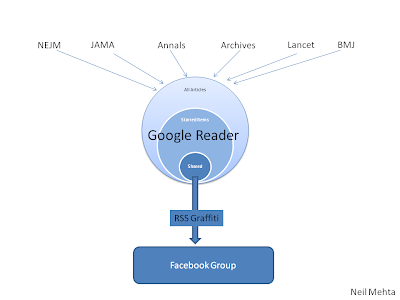
In any case, Cleveland Clinic, ever the innovator, actually has a Journal Club on Facebook. Dr. Neil Mehta wrote a great summary on their model, using Google Reader and Facebook, check it out here: http://goo.gl/rnw2P


In conclusion, from personal experience, I would say that you can only learn when people criticize your project - it is the most helpful kind of feedback that you typically get for free.

Please consider visiting the website and Twitter account of this new Twitter Journal Club (http://twitjc.wordpress.com), follow the hashtag #TwitJC and enjoy the new editions.

Comments from Twitter:

@DrVes: Did you find #TwitJC useful? @EugenieReich is looking for scientists to be interviewed in Nature. I think the second event was very engaging and useful. That said, #TwitJC is more a Twitter chat on a topic/article rather than a Journal Club as we think of it in the U.S. This brings me to the third tweet on the topic: Do we need separate #meded tags for different parts of the world? http://bit.ly/maPEwm

@amcunningham: well, it's a journal club the way we think of it in the UK... A noisy, hectic one!- but gets the job done :) #TwitJC

@DrVes: Right. Different from what we typically do here, e.g. discuss every detail of a recent (very recent) article, focused on one topic.

Related reading:

Twitter Journal Club: yet another ‘revolution’ in scientific communication? BMJ http://t.co/NrB7KAJ - Any plans for Google+ Journal Club now?

Virtual Journal Club for Hospital Medicine by the Washington University in St. Louis

Friday, June 3, 2011

The central part of medicine is patients - don't push them out of social media

Clinical medicine is disappearing fast as topic for blog posts

Something happened to medical blogs in the past 6-12 months. They now seem a lot less interesting, more industrialized and aggregated. They have also become "too safe", generic and detached for regular reading.

There seems to be a rise of group blogs, guest posts and semi-syndicated contents. Several "clinic-focused" health bloggers have retired due to a variety of professional and HIPAA-related concerns.

It looks like clinical medicine is disappearing fast as a topic for blog posts in the U.S., replaced by posts about social media itself. As a side note, "social media" is actually a plural noun (media vs. medium), but it seems to be used mostly in singular form nowadays.

The central part of medicine is patients - don't push them out of social media

The central part of medicine is patients. Yet, we tell doctors: "never, ever blog about patients". This somewhat misguided advice displaces the most important part of the equation - the patients themselves.

Some health bloggers claim that we have to "aim above HIPAA" to avoid privacy breaches and comply with the highest standard of professionalism required by our occupation as physicians. How high "above HIPAA" is good enough though? In most clinical scenarios, the compliance with omitting the 18 unique HIPAA identifiers strikes the right balance.

Physicians must maintain appropriate boundaries of the patient-physician relationship in accordance with professional ethical guidelines just, as they would in any other context. When physicians see content posted by colleagues that appears unprofessional they have a responsibility to bring that content first to the attention of the individual, so that he or she can remove it and/or take other appropriate actions. If the behavior significantly violates professional norms and the individual does not take appropriate action to resolve the situation, the physician should report the matter to appropriate authorities (Source: AMA Policy: Professionalism in the Use of Social Media, 2011; my edits are in bold in the text above).

Different standards for individual doctors vs. health system conglomerates

There seems to be a discrepancy of the methods employed by doctors and institutions when using social media. We tell doctors: "never answer patient questions on Twitter". Yet, Cleveland Clinic runs regular Twitter chats soliciting patient questions which are then answered by doctors and healthcare personnel. Mayo Clinic and other institutions do the same.

A blog is your notebook for lifelong learning

Don't forget the most important thing: A blog is your notebook for lifelong learning. Doctors learn from their patients every day. Patients learn from their doctors every day too. Both groups must try their best to excel in the joint quest to achieve the best possible outcome.

Comments from Twitter

@scanman (Vijay): 3 doctors, @kmathan @razmohan & I, set up a twitter account @DrTamil to answer medical queries from Tamil tweeters.

@DrVes: You know the comment that you are going to get, right? "It will never happen here."

@DrVes: New trend: Hospitals tell doctors-in-training point-blank during orientation: "Don't blog. Don't tweet." Consequently, interns close blogs and Twitter accounts (confirmed via email from a trainee).

@macobgyn (MacArthur Obgyn) why do you think that is?

@SarahStewart (SarahStewart): I wonder if medical blogs are reacting to fear of litigation etc.

@DrVes: I'm sure they are. The community itself is not making things easier either.

@Skepticscalpel (Skeptical Scalpel): You're reading the wrong blogs. Try mine http://skepticalscalpel.blogspot.com

@CardioNP (Cardio NP): mirroring medicine in general? Agree w you re blogs; miss the early years ~2004-5. Agree skeptic that ur blog is a nice welcome addition

@marciovm (marcio von muhlen): will change as social media permeates society, informed consent will be feasible re: sharing medical info. Difficult to explain now.

@scanman (Vijay) This tweet - http://bit.ly/mpPL0P - by @DrVes, one of the most consistent medical bloggers, was meant for the Social Media Moral Police.

@vincristine (Vincristine): Who is 'we'? I imagine doctors will tweet what, where and how they choose to tweet, no matter what 'we' say

@laikas Laika (Jacqueline): A lot of interesting observations by @DrVes on the evolvement of medical blogs & social media use. I will take up my #FF habit #ff @DrVes

References

“The powers of medicines and the practice of healing - to exercise the quiet art” - Virgil, Aeneid http://goo.gl/5BUb3
The making of a modern physician - The Lancet http://goo.gl/SYfTu
Strictly speaking, “Doctor” is a word incorrectly applied to most medical practitioners http://goo.gl/wjA0S
Despite the dire warnings, use of social media among emergency physicians is unusually strong http://goo.gl/QlqnK
AMA Policy: Professionalism in the Use of Social Media, 2011.
Image source: Wikipedia, GNU Free Documentation License.

Related reading

Why I became an oncologist - by the president of the American Society of Clinical Oncologists - a patient defined his professional life. CNN, 2011.
Patients can teach us so much. We must pay attention. And yet some people want to silence their voice on blogs and Twitter.
Keeping all regulations in mind, a medical student soon finds there is nothing to blog about: http://goo.gl/541pj
HIPAA found in Hippocratic Oath: Keep the patients’ secrets a secret. Also: My colleagues will be my brothers and sisters http://bit.ly/pGObLI

Disclaimer

I am the Editor-in-Chief of several case-based curricula of medicine and related specialties. This is the information regarding patient data: There is no real life patient data on this website. Please note: we do not write or “blog” about patients. All case descriptions are fictional, similar to the descriptions you can find in a multiple choice questions textbook for board exam preparation. Case courses and descriptions do not follow real cases.

Thursday, May 5, 2011

For doctors: How to be a Twitter superstar in 2 easy steps and 30 minutes per day

Warning: The purpose of this article is to inspire you to use Twitter, not to scare you. There are plenty of other blog posts and newspaper articles about doctors posting pictures of body parts on Facebook and getting fired. This is not it. Social media is amazingly useful for doctors and patients if you use the tools responsibly, have common sense, and never share the 18 HIPAA identifiers online or offline with unauthorized parties. The advice below is derived from extensive personal experience. I have used social media for professional purposes, as a physician, for more than 7 years, while working at some of the leading institutions in the U.S. such as the Cleveland Clinic and the University of Chicago. My account @DrVes was ranked #6 on the list of the Most Influential People from Chicago on Twitter (selected by Chicago Tribune and Klout.com). My blog websites have had more than 8 million page views. Just as an example, every time I hit the "publish" button of the sites, the message reaches more than 30,000 people every single day: 17,000 RSS and email subscribers, 9,000 Twitter followers, 3,000 daily visitors, and 1,500 Facebook fans (statistics for the sites ClinicalCases.org and CasesBlog, AllergyCases.org and AllergyNotes, and the Twitter accounts @DrVes and @Allergy).

This is somewhat of a typical example nowadays. There are many other physicians who are much more popular than me on social media and make the stats above look minuscule. You can be one of them. Here is how.

The basics of Twitter use for busy doctors

Most doctors are really busy. Several questions always come up when doctors consider the use of social media for professional purposes: Who has time for Twitter? What am I going to say there? To whom? And why Twitter, to begin with? What about Facebook or YouTube? My office is a mess and I always say "ehhh" when recorded -- I don't want to do video. Do I need a blog too?

Good questions. Here are the answers.

The circle of online information for me is as follows: Google Reader -> Share on Twitter -> Get feedback -> Write a blog post -> Share via RSS and Twitter -> Get feedback, go on. You don't need to use all services.

Here is how to facilitate the Rise of the ePhysican who works hand in hand with the ePatient:


1. Who has time for Twitter?

You do. Twitter should take no more 30 minutes per day and it will be beneficial for you, your colleagues and your patients. You will learn more and will feel better about it. Make it part of your normal routine - just like checking the news. In fact, Twitter is just that - checking the news - and then sharing the ones that you find most interesting with your followers. This takes a single click, and 2 seconds. Ten tweets per day, 2 seconds each. This is 20 seconds. You can do it.

2. Why Twitter?

Start on Twitter because it is quick and relatively easy. Twitter has the lowest barrier to entry among all social media services. "Being on Twitter" requires just 10 short sentences per day, with approximately 7 words each. You can reach thousands of people with a single sentence. Would you like to share the latest guidelines for food allergy? Just click and all your Twitter followers will know about them instantly. You will also get feedback to your tweets via replies and re-tweets.

3. What am I going to say on Twitter?

The answer is simple. You are an expert. There is a flood of medical news that hits the wires every day. I want to know what YOU think is important. Share the 3-10 news items per day that you find interesting. I will subscribe to read them. Many will do the same.

4. Who is going to read my tweets?

As a physician, you are an expert in your field. You provide valuable insight - just be selecting what you think it’s important from the news of the day. Embed this little personal news stream in your practice page. Your patients will appreciate the helpful updates, hand-picked by their doctor. Your colleagues may find it interesting too.

5. What about Facebook or YouTube?

Those are nice but I would start on Twitter first, and then expand if you see the need to do so. It may be a good idea to start a like/fan page on Facebook for your practice and re-post some of the tweets there. This is simple and not time-consuming. It can be done automatically.

6. Do I need a blog too?

Only you can tell if you need a blog. If you feel that you need to expand beyond 7-8 words on Twitter, by all means, start a free blog on Blogger.com by Google or WordPress.com and see how that works for you. Start on Twitter and expand to a blog as a natural extension if you need to write longer or provide some background. Post your blog items in your Twitter feed.

How to be a Twitter "star" in two easy steps

This is easy. It’s a two-step process for beginners and it takes about 30 minutes per day. The best time is just after your kids go to sleep.

1. Review the news of the day from Google Reader. I have ready-made subscription RSS bundles for you below. Alternatively, you can check a service such as Webicina.com for RSS feeds in your specialty.

2. Post the news items that you like best on Twitter. Don’t post all 10 tweets at once. Schedule them evenly throughout the next day. The first tweet goes on at 7:30 am EST and the last one at 8:30 pm EST. You can use Seesmic Web to schedule tweets - it is simple, free, and just works. The alternatives include HootSuite and any number of scheduling services (some of them have a limitation of up to 10 tweets per day).

This summary did no address the other Twitter activities such as listening, engaging, search, chat, HIPAA compliance, etc. They will be discussed in future articles.

RSS bundles of medical news

You can use the following RSS bundles to subscribe to medical news items. The bundles are exported from my personal Google Reader page. They update automatically several times per day. When in Google Reader, just select the ones that you find interesting and share them on Twitter. Feel free to add your own comments to some of the tweets.


Top Twitter Doctors

This is a list of the Top Twitter Doctors arranged by specialty in alphabetical order - feel free to add your own suggestions. The list is open to anybody to edit:


Related reading

What are the Downsides of Social Media for Doctors? Dr. Wes shares insights from 6 years of blogging

Saturday, April 30, 2011

For doctors: How to start using social media

How to start

My advice for doctors who are interested in using social media for professional purposes is simple:

- Start on Twitter, expand to a blog as natural progression.
- Input your blog posts automatically to a Facebook like/fan page.
- Listen to the leading physicians, nurses and patients' voices on Twitter, and reply.
- Comment on blogs.
- Do not be afraid to share your expertise.
- Comply with HIPAA and common sense.

I posted this on Twitter yesterday: Doctors, when you don't have time to write a blog post, record a video - the orthopedic surgeon @hjluks shows how it's done: http://goo.gl/jL73J


Howard J. Luks, MD

@Doctor_V (Bryan Vartabedian) said, "My blog is my home. Twitter and Facebook are outposts."

I actually disagree a bit. My use of Twitter goes beyond a simple outpost. It's my digital notebook and idea feedback system.

The circle of online information for me is as follows: Google Reader -> Share on Twitter -> Get feedback -> Write a blog post -> Share via RSS and Twitter -> Get feedback, go on.

Here is how to facilitate the Rise of the ePhysican who works hand in hand with the ePatient:


Substance over style

Going back to the video embedded above, I think that @hjluks is the current leader in creating original, honest, tell-it-like-it-is clinical content among physicians. This is an example to follow. The technical execution does not have to be perfect, as you will see from the discussion started on Twitter and summarized below. However, the content must be factually correct and professional.

@yayayarndiva (P. Mimi Poinsett MD) had a few comments about the technical aspects of the video such as "if you are going to do a video - make your background a tad less busy:)"

I actually liked the background - it's "authentic" and gives you something to look at during the 8-minute video.

@hjluks actually polled 100 patients on that. They like the laid back office view.

@yayayarndiva P. (Mimi Poinsett MD) thought that "authentically messy AND 8 min video with a head in bouncing chair - think I would rather read the transcript... I think docs like everyone else can sharpen their presentation skills with video... still good to continue. Video? A talking head doesn't confer authenticity- just a new toy:)... Or you could use Dragon software and dictate your post..."

@ePatientDave (Dave deBronkart) convinced @hjluks to do the transcripts, primarily for Google. "Otherwise, thy pearls of light are hidden under a YouTube bushel. I emphasize it's not just *marketing* SEO - it's for being findable for those in need", said @ePatientDave.

I agree. You need the transcript for SEO and quick info. SEO doesn't just apply to marketing - it's a way for people (real humans) to find you online.

Nothing beats video for authenticity though. I understand the concept of creating technically flawless presentations but if you wait to do a perfect video and you are a busy doctor, you may never do it. The same applies to blog posts - if you are going to write a blog post for 2 months, write a journal article instead.

I had some final encouragement for @hjluks: "You don't have to be pro with video. You are pro as orthopod - who uses video."

I think he liked that.

Do you need a social media policy for your medical practice?

Another good discussion point was brought up by an office manager of a pediatric group in Chicago: Do you need a social media policy for your medical practice? http://goo.gl/7APvI - I think you do.

John Sharp and I worked on a social media policy for Cleveland Clinic back in 2005 when all that was a big unknown in healthcare. It still is for many organizations - in terms of professional involvement and outreach. A social media policy provides some much needed guidance and boundaries.

The number one rule is very simple: comply with HIPAA and do not share any of the 18 identifiers: http://goo.gl/WR5MR

12-Word Social Media Policy by Mayo Clinic: "Don’t Lie, Don’t Pry, Don’t Cheat, Can’t Delete, Don’t Steal, Don’t Reveal" (http://goo.gl/1Jwdo).

Top Twitter Doctors

This is a list of the Top Twitter Doctors arranged by specialty in alphabetical order - feel free to add your own suggestions. The list is open to anybody to edit:


Comments from Twitter and Facebook:

Bryan Vartabedian: "When I present this stuff I recommend doctors find 2-3 role models in their specialty and follow them. Watch and study how they do things. Great place to start."

Related reading

What are the Downsides of Social Media for Doctors? Dr. Wes shares insights from 6 years of blogging

Wednesday, May 5, 2010

How do you keep up with health news?

Steve Rubel asks How do you keep up with industry news - RSS, email newsletters, Twitter, Facebook or other (elaborate)? He now primarily uses newsletters, Twitter and Facebook to follow several dozen sources. He uses his RSS reader as an archive:

http://www.facebook.com/steverubelstream

This does not work very well for me. Google Reader is still one of my primary sources for health information - I channel Twitter feeds, YouTube subscriptions, Flickr and podcasts through it as well.

The RSS reader collects all rich media in one place - a true "inbox for the web". The disjointed approach described by Steve Rubel above can be confusing to many and a time-waster to even more. Everybody has their own preferences, of course.

For example, Steve abandoned his popular blog MicroPersuation to move to life-stream, then Facebook. Alternatively, I decided to stay with my blogs and send their updates to Twitter and Facebook. My blog is still my home on the web. You can build a professional profile on LinkedIn, Google and (may be) on Facebook but I decided to keep a separate website just for profile information. You can build it for free on Blogger.com by Google, control every aspect of it, and the only expense is the fee for domain registration ($10).

Comments from Google Buzz:

Tim Sturgill - I've started to use GR as you are for Twitter. I wish Twitter had RSS for direct messages as well.

Vamsi Balakrishnan - I use Google Reader for my news sites (both tech and health). And, for the individual people I follow, like you, I'd use my Buzz. Every few days I log on to Twitter to check messages / replies / etc.

Lakshman Swamy - GR and buzz!

Tuesday, April 13, 2010

How to use Google Docs Drawings for medical mind maps

Google Drawings is a new collaborative drawing editor - part of the updated Google Docs. It is free to use, just like the rest of Google Docs. The new standalone drawings editor lets you collaborate in real time on flow charts, designs, diagrams and other fun or business graphics. You can copy these drawings into documents, spreadsheets and presentations using the web clipboard, or share and publish drawings just like other Google Docs.


Until now, my service of choice for medical mind maps was Bubbl.us and I have made more than 100 diagrams with it for AllergyCases.org:

Mind Map Diagrams in Allergy and Immunology

Bubbl.us works very well but I was concerned about embedding the mind maps in case the service goes down temporarily or if the company closes down in the future (mind maps can be exported in XML format for backup). None of these should be a problem with Google Docs. Drawings is obviously behind Bubbl.us in terms of features but it works for basic mind maps and I am planning to use it frequently in the future.

You can embed the minds maps as images, just like you do with YouTube videos, or provide a link to the original mind map and share it for collaboration:

Example: Accidental Injection of Epinephrine Into Finger

Every time you update the mind map in Google Docs/Drawings, the image updates too.

See a few mind maps created with Drawings below:


In order to publish the mind map diagram on the web, you have to click the "Share" button in the top right corner of the Google Docs menu. After the diagram is published, you will see the options to embed the image with different sizes and the link to share the original drawing with options to be edited by collaborators.
Getting started guide for Google Drawings
Can images (mind maps, infographics) stop data overload? Symptom of the computer age: overwhelmed, we delay decisions http://goo.gl/URMKm
University of Cambridge shows high-resolution Newton notebooks online. He used mind maps - check Trinity College Notebook, image 5.

Comments from Twitter:


Robbo @BiteTheDust: excellent. will give it a go RT @DrVes: How to use Google Docs Drawings for medical mind maps bit.ly/J4BX7U

Sunday, April 11, 2010

29 Debates About the "Right Way" to Blog

ProBlogger collected 29 Debates Bloggers Have about Blogging. Some of my responses are listed below, see ProBlogger's site for the complete list. Please share your thoughts in the comments.

RSS Feeds - Full vs Partial Feeds
- My opinion: Full feed.

Comment Sections – Comments vs No Comments
- Comments always open.

Post Frequency – Post More vs Post Less
- Short posts daily.

How Many Blogs? – Focus upon One Single Blog vs Having Many Smaller Blogs.
- I have 3-4 blogs.

Domain Names – long vs short, hyphens vs non hypens, .com vs other extensions (like .net, .org), local vs global domain extensions
- Short names, free domain names by Blogger.com.

Hosting – hosted vs self hosted
- Hosted by Blogger.com.

Post Titles – descriptive vs keywords
- I use natural language post titles - descriptive.

Content – Link content vs Original content
- Mostly links and comments, I wish I had more time to write long-form original content.

Design – Professional Design vs Templates
- I modify the templates to create my "own" designs. It's quite enjoyable actually.

Ownership – Use Social Media vs Build Your own properties
- I think your blog should be your "home" on the web.

Post Length – Long in Depth Posts vs Short, Sharp Posts
- Again, I wish I had the time to write long posts but I don't.

Topic – Niche vs Broad Topics
- Niche topic blogs work better.

Blogger Name – Anonymous blogging vs Using Your Name
- Using your name is a much better approach for medical bloggers.

Subscribers – RSS is Best vs Email is Best
- I like RSS better.

SEO – Writing for Search Engines vs Writing for Humans
- I write for humans only.

Personal Blogging – Sticking to Topic vs Injecting Personality and Personal details
- I try to write objectively from a scientific perspective. Personal stories are probably better suited for a paper diary.

Comment Moderation – Highly Regulated and Moderated vs Anything Goes
- I moderate all comments and delete all self-promotional and possibly offensive material.

Social Media vs Search – focus upon social media rather than search engines as traffic sources
- If you write quality content, Google will find you.

LinkBait – Anything goes (e.g.. Personal Attacks) vs Strong Boundaries Around What is and Isn’t Acceptable
- I don't use link baits and I have never posted anything even close to a personal attack on my blogs.

Bloggers Participation in Comments – Respond to Every Single Comment vs Let Readers Talk to Each Other and Don’t Interact
- I don't feel compelled to respond to every single comment. Let readers interact.


This Google video shows that it takes about 2 minutes to start a blog on Blogger.com. Creating a web site has never been easier.

References:
29 Debates Bloggers Have about Blogging. ProBlogger, 2010.

Wednesday, April 7, 2010

Scaring physicians away from using social media

Is there a doctor who wants to spend 3 hours per day on social media while running the risk of being sued?

This useful critical review by a freelance journalist at the NEJMJobs site has a focus on some of the litigation risks inherent to the use of social media in healthcare:

http://www.nejmjobs.org/career-resources/social-media-and-physicians.aspx

"Dr. Pho, who spends up to three hours a day in social media activities, is surely in a minority of physicians who devote considerable time to blogging, Twittering, or engaging in Facebook updates.

Social Media Activity Risks Difficult to Predict

Despite the potential professional benefits of social networking participation, some physicians are approaching the social media realm with trepidation, for fear that personal and professional presences will overlap in a manner that increases liability exposure.

That’s a valid concern, because the medico-legal aspect of social media activities has been little explored and is not well understood. In addition, the obvious risks of incurring HIPAA violations should patients’ health information be unwittingly exposed are a deterrent. “The laws haven’t caught up with social media and networking, so to be safe I don’t blog about my patients,” Dr. Pho said. “Even though I think that interesting or challenging cases can be used as a learning tool, too much of my professional livelihood is at stake.”

None of the physicians interviewed for this article have accepted patients’ requests to become Facebook friends, and all cited concerns that doing so would “cross the boundary” between a personal and professional relationship.

"I think that very few doctors are interacting with patients directly on Facebook because we’re so terrified of being accused of practicing medicine and getting sued. Whatever you type is eternal and a perfect record of whatever you said,” she said. “That makes it all even more scary.”

“We’re concerned about this because there have been instances in which physicians have used Facebook in an inappropriate manner,” said David Troxel, MD, The Doctors Company’s medical director. “Social media networks are not HIPAA compliant and are just not appropriate for any physician-patient communication, so it’s a real liability threat because it’s so easy to lapse into a casual conversation.”

The NEJMJobs article linked in the paragraph above does not discuss the use of social media for medical education of students, residents and patients.

Another area that was not highlighted enough was the widespread use of Facebook "fan pages" by hospitals and physicians to attract patients and create relationships. Does this mean that the patients can be "your fans" but not "your friends"?

Overall, this article is a good review of some of the risks involved with the social media adoption in healthcare.

However, for a more nuanced approach to social media use by physicians, please review this detailed primer by the cardiologist Dr. Wes:

http://drwes.blogspot.com/2010/03/for-cardiologists-twitter-primer.html

Related:
Facebook Friend Request - A young doctor gets a message from a dying patient - NYTimes, 2010.
Image source: OpenClipArt.org, public domain.

Updated: 04/13/2010

Monday, January 25, 2010

Web 2.0/Social media tools for scientists

@Berci asked: "Will talk about science 2.0 for scientists on Wednesday. Any suggestions what to cover beside the obvious things (RSS, Twitter, etc.)?"

Beyond the obvious:

- Google Docs for manuscript collaboration and data sharing.

- Google Trends for research. We have some very interesting data from Google Trends regarding prevalence of allergic diseases - it is very useful for hypothesis generation and is free. Google Trends use does not require an IRB approval or patient consent and therefore the research process can be quicker.

- Google Chrome has become my preferred browser, I don't store many files locally, work from the cloud (Google Docs) and move bookmarks between computers.


Video: Google Docs in Plain English.

Updated: 02/12/2010

Friday, January 22, 2010

New trends in social media and medicine

* There is a new trend during the last 6-10 months: Some medical blogs are adopting the Huffington Post model (or something similar) with extensive use of guest- and cross-blogging.

* Independent solo medical bloggers may be going the way of the dinosaurs... Only in this case, they are being replaced by content aggregation or group blogs.

* Many medical bloggers/Twitters start strong, microblog their tail off, and then disappear - doctors are not quitters - why does this happen?

* We all have an ecosystem in social media, believe or not, you're part of it.

* Twitter HTML code of your profile automatically includes several "me" variables - making it your primary home on the web - this should be "opt in". Add One Line To Your Blog - or Twitter Could Become Your Primary Identity http://bit.ly/2lFRNH

There are an exponentially increasing number of ways to "follow, tag, talk, poke, nudge" and communicate in the virtual world. The Conversation Prism by Brian Solis (see the expanded flickr image) shows most social media facets:


This "flower" of Internet communication replaces the old starfish of Web 2.0 shown below:


Social Media Starfish created by Darren Barefoot (Creative Commons license).

Sunday, January 10, 2010

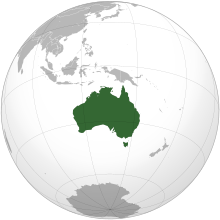
Australian Hospital Social Network List

Mike Cadogan (@sandnsurf) is one of the best medical bloggers, with a "local Australian presence and a world-wide distribution" through his blog Life in the Fast Line and Twitter account.

Mike has assembled a table showing the Australian Hospital Social Network List (click to see it) but was a little concerned by the blank spots - many hospitalis did not have any social media presence - no blog, YouTube channel, not even a simple Twitter account.

Here are my comments to Mike on Twitter:

The growth in the social media use by Australian hospitals will come gradually, the U.S. still leads the trend and Europe follows a bit behind.

I remember when I first introduced my blogs to the Cleveland Clinic executives in 2005 - it was such a novel idea, almost unheard of. No hospital had an official blog in 2005 and look at us now - Ed Bennett maintains a list of the U.S. hospitals using social media and it is getting longer every week.

Hospitals have to see the benefit of social media and face even wider adoption by the general population before they begin to use them. It is still a relatively conservative field.

Australian hospitals lag behind U.S. in social media use: only 13% of them are on Twitter, 11% Facebook, 10% YouTube http://goo.gl/eKZWW

References:

Australian Hospital Social Network List 2009. Life in the Fast Lane.

Related reading:

Health, Science, Nursing, Midwifery and Medical Blogs from Australia and New Zealand
Map of U.S. Hospitals with Official Social Media Accounts
Image source: Wikipedia, public domain.

Thursday, January 7, 2010

New project for all doctors in 2010: Start on Twitter, continue on Blogger and make an impact

A few thoughts from my Twitter account:

A suggested new project for all doctors in 2010:

1. Start on Twitter (microblog).
2. Continue on Blogger/WordPress.
3. Make an impact. Improve the quality of online health information and tell the public your side of the story.

In addition, although some people enjoy ridiculing blogs as low-quality content, they offer a great start for would-be writers. Several bloggers that I follow are planning to write books in 2010 based on their blog posts from 2009. There is so much talent out there.

Blogging is a good way to keep track of interesting development and medical news. Twitter is probably the easiest way to start.


This Google video shows that it takes 2 minutes to start a blog on Blogger.com. Creating a web site has never been easier.

Tuesday, December 1, 2009

How to follow Twitter users in Google Reader

In summary, @dreamingspires asked how you can follow more Twitter users without feeling overwhelmed with updates.

I only follow around 60 people on Twitter who in general do not post very frequently.

However, I follow more Twitter accounts in Google Reader which is actually nicer because I see the tweets grouped by user and I can use tags/folders. TweetDeck has groups but Google Reader is more efficient, it also has better search and saves all tweets. In addition, Google Reader is available from any Internet-connected computer while the current version of TweetDeck is only desktop-based. Seesmic has a web version but Google Reader is more efficient.


A screenshot of some of the medical Twitter feeds I subscribe to in Google Reader.

In short, you can expand the number of people you follow on Twitter by subscribing to their RSS feeds in Google Reader.

Currently, there is no tool that works better with large inflows of information than Google Reader in "condensed" view. Try switching the view modes in Google Reader by pressing the "1" and "2" keys.

@dreamingspires was concerned that interacting was not possible with the RSS feed but in fact it takes only 2 clicks - click on the tweet in Google Reader, which opens the Twitter page, and then click "reply".


The circle of online information (full version) (click to enlarge).

Related:
How to deal with the information overload from blogs, RSS and Twitter

Wednesday, April 22, 2009

Some thoughts on medical blogging vs. Twitter

These are some thoughts on medical blogging from my Twitter stream:

  • If you are a medical blogger, don't abandon your blog for Twitter. Look at Scoble for an example.

  • If you are a prolific Twitterer (somebody who posts a lot on Twitter and/or has many followers), consider starting a blog.

  • Start a blog plus Twitter - just a piece of advice from somebody who has had a medical blog for 4 years.

  • Twitter "brings business" to the blog. Visitor numbers went up and I often get comments on Twitter rather than on the blog.

  • Twitter brings new ideas, and the blog generally feels "fresher" and more in the flow of things (it could be temporary).

  • Nobody enjoys blogging all the time. There are ups & downs like everything in life. Blogging due to external stimuli (comments, newspaper coverage) always stops.

  • Medical blogger rule #1: write for your own CME and create an educational portfolio = best road to blog longevity.

  • Some people don't like too many posts, others don't like too few. Post what you think is useful, what you want to read.

  • Most good medical bloggers are very supportive and encouraging. Always ask for advice when you need it.

  • Twitter is easy but doesn't "last" - apart from the embarrassing posts, of course.

  • Many people don't feel like writing a blog - so many great/funny/silly ideas would have gone unpublished if it weren't for Twitter.

  • Social media is (still) a matter of personal preference. You cannot "make" doctors blog unless they want to.

  • In a way, Google itself is a social bookmarking tool too - you vote by linking from your website.

  • There will not be Twitter (in its current form) in 2-5 years, it's so rudimentary.

  • I could be wrong but I just don't think Twitter popularity & hype will last very long. That's why I re-post the valuable bits on my blog.

  • FriendFeed is a better platform but the "crowd" is on Twitter.

  • For companies, resistance to social media is futile: Debunking 6 Social Media Myths http://is.gd/k6c4

Here is how to facilitate the Rise of the ePhysican who works hand in hand with the ePatient:


References:
How to deal with the information overload from blogs, RSS and Twitter?
Assistant professor uses Twitter to teach students dental anatomy at Ohio State University - 113 of 200 students signed up, 56% http://goo.gl/jvyq7

Wednesday, March 18, 2009

4 Ways to Use Twitter to Bring New Life to Your Blog

Here is how to facilitate the Rise of the ePhysican who works hand in hand with the ePatient:


I have had a blog since March 2005 and a Twitter account since June 2008. Unexpectedly, I found that Twitter has brought new life to my blog in terms of new ideas, more material and blog posts. The frequency of my blog posts increased from 3-4 per week to 2-3 per day. The number of RSS subscribers through FeedBurner increased from 1,900 to 4,000. The daily page views also increased from 2,000 to 4,500 (for both ClinicalCases.org and CasesBlog).

What is hard to measure but much more valuable is the interesting, inspired and generous people I found on Twitter. The service has a community that leaves other more complicated social networking websites such as Facebook in the dust.

Here are 4 ways Twitter brought new life to my blog. Try them or something similar and see if they work for you.

1. Selection of My Twitter Favorites

Twitter is a microblogging service where people answer the question "What are you doing?" via 140-character messages from their cellphone, laptop or desktop. You can select the messages (called "tweets") that you find useful, amusing, or both. Here is the 47th edition of My Twitter Favorites (the oldest post is at the bottom, the newest at the top): Micro-blogging on Twitter is easy, fun and can be very useful and educational if you follow/subscribe to interesting people.

You can read more here: A Doctor's Opinion: Why I Started Microblogging on Twitter and
visit my accounts at @DrVes and @Allergy

2. Health News of the Day

Health News of the Day is a daily summary made from the selected links I post on Twitter. It is in a bullet points format with links to the original sources which include 350 RSS feeds that produce about 2,500 items per day.

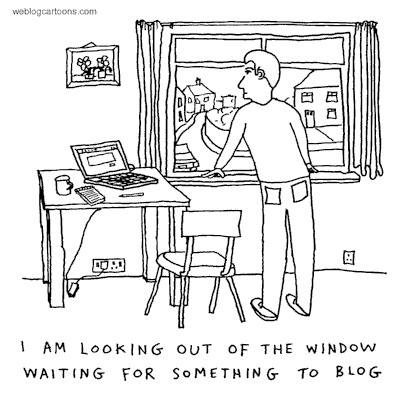
3. Medical Geek Humor on Twitter

Messages (called "tweets") that are posted by health workers and are useful, amusing, or both.


Image source: We Blog Cartoons. Free cartoons for your blog.

4. New Post Ideas

Twitter serves as a link collector and a notebook for me. I share interesting bits of information there and they often provoke responses and comments from people who follow me. Twitter is a two-way street which means that I receive may interesting links and ideas from the people I follow. The whole process creates a matrix for at least several blog posts per day. The rate limiting step is the time one has to devote to writing a blog post.

References:

How to deal with the information overload from blogs, RSS and Twitter?
Out of Blogging Ideas? Use Twitter!
Check the series "What I Read" by different people in The Atlantic (scroll to the bottom of the page to see other links) http://goo.gl/xWUb

Monday, March 16, 2009

How to deal with the information overload from blogs, RSS and Twitter?

A typical scenario:

You gradually increase the number of your RSS (Really Simple Syndication feeds) and Twitter subscriptions until you feel like "drowning" in a sea of information.

What to do? How to cope with the information overload?

A few tips from personal experience are listed below. Naturally, this writeup was provoked by a recent Twitter conversation.

Use Google Bookmarks to save useful links and control anxiety over information overload

Save all useful links in Google Bookmarks with labels "To Read", "To Blog," etc. Check the links a week later. You will realize that few from your saved links are worth a second look. This usually removes a large part of the anxiety over information overload.

Check your Twitter updates from last month or even last week. How many of them don't make much sense anymore? How many of them helped somebody? This also helps with the anxiety over information overload.

The key is to save the interesting links you find in a searchable database like Google Bookmarks. You can always look them up later.

You can export your Google Bookmarks at any time. Google does not lock up your data. Delicious.com, bought by the YouTube founders in April 2011 is an excellent alternative. However, Google has the advantage of a single signon for most of the services described in this article.

Use Google Reader to channel and manage large volumes of information

Channel most RSS feeds and high-volume Twitter users (more than 20 updates per day) through Google Reader. Use the "star" and "share" functions of Reader. Save to Google Bookmarks, and blog.

You don't have to read all RSS items in Google Reader (I have 500 RSS subscriptions which produce around 3,000 items per day). Just scan the headlines in Google Reader. Use folders for the ones you really want to read. I constantly switch between "condensed" and full view in Reader by using the keyboard shortcut "1" and "2".

I "star" or share the items in Google Reader that I would like to read later. The really valuable ones are saved in Google Bookmarks. Don't forget that Google Reader searches all the posts you received in you "inbox for the web". You can search only "starred" or shared posts, a particular feed, etc.

Try to "clear" your Google Reader unread items down to zero at the end of each day by following the simple sequence "bookmark, share, star, Twitter and blog. Done."

Twitter - how to control the "fire hydrant" flow of information

Twitter.com is inefficient for dealing with large volume of information. TweetDeck and Seesmic Web are better. Twitter search alerts and "subscribe to RSS" of individual users also work well. Twitter also takes time because if often requires you to click the shortened URL to see the source and full text. Google Reader extracts the full text (for full text feeds) or a snippet.

It takes approximately 2 hours a day to keep up with 200 RSS subscriptions, 100 Twitter accounts, and maintain the blog(s). It is doable, if you don't watch TV.

Centralize your online activities to gain full control over information flow

Centralize all files and links, etc. as much as possible. Make them searchable. Google services with backup is probably your best option at this time. I use Google Reader, Bookmarks, Blogger, Docs, Calendar, Gmail, Tasks. Make your information scanning and analysis centralized and as simple as possible. Use as few services as possible.

A circle of online information for maximum efficiency and impact

The circle of online information is as follows: Google Reader -> Share on Twitter -> Get feedback -> Write a blog post -> Share via RSS and Twitter -> Get feedback, go on.

Here is how to facilitate the Rise of the ePhysican who works hand in hand with the ePatient:


You may want to import your Twitter feed in Facebook as status updates by adding the Twitter application to Facebook.

Backup gives you peace of mind

I keep most my files and project in Google Docs. My browser of choice is Google Chrome with 5-6 extensions - RSS, Chromed Bird, password manager, Page Rank check, etc. If I can't install Chrome, I carry 2-3 portable browsers on a USB drive with favorite bookmarks or Chrome Sync. Good portable browsers include Chrome, Opera and Firefox.

I have an archive of scanned documents in PDF format, photos, video files, etc. that is backed up to Amazon S3, Amazon Cloud Drive and several external hard drives. The files are encrypted with 7zip and protected by 30-character unique passwords.

That's a start. If you have any suggestions, please share them in the comments below. If you have any questions, feel free to email me (the address is at the bottom of each page on this website).

References

How to Become a Super Tweeter in Just 15 Minutes a Day with iGoogle. MicroPersuasion, 2009.
Tips: How to Filter and Manage Your Online Social Life http://is.gd/vZnf
Information overload. Life in the Fast Lane, 2009.
Strategies for coping with information overload in medicine - the ostrich, the pigeon, and the owl strategy. BMJ, 2010.
Check the series "What I Read" by different people in The Atlantic (scroll to the bottom of the page to see other links) http://goo.gl/xWUb
Practical tips for better science blogging - check the comments: http://goo.gl/B1n9
Using Instapaper, RSS and Twitter to Create Your Internet Newspaper. Bridging the Nerd Gap, 2011.

Updated: 04/27/2011